Tech Focus: Understanding Resolution in Machine Vision
Resolution is a critical specification in imaging systems, yet it’s often misunderstood or oversimplified. When selecting cameras for industrial applications, understanding what resolution really means, and how it is affected by other system parameters, can make all the difference between a successful deployment and a costly failure.
What Resolution Actually Tells You
At its core, resolution refers to the number of discrete pixels a sensor can capture. A 5 megapixel (MP) camera has approximately 5 million pixels arranged in a grid, typically something like 2448 x 2048 pixels. But raw pixel count is just the starting point.
True system resolution depends on multiple factors: sensor size, pixel pitch, lens quality, lighting, and the specific requirements of your application. A 12MP camera isn’t automatically “better” than a 5MP one. The right choice depends entirely on what you’re trying to see.
Selecting the Right Lens
In vision systems, the lens is also important in determining the final image quality and resolution. While the sensor sets the theoretical maximum resolution based on its pixel count, the lens controls how much actual detail reaches those pixels. A lens’ ability to resolve fine details is measured by its Modulation Transfer Function (MTF), which indicates how well it transfers contrast and sharpness from the object to the sensor. If a lens has poor optical quality or insufficient resolving power, it will blur the image before it even hits the sensor – meaning you could be coupling a 25MP sensor but only getting the performance of a 5MP one.
Color vs. Monochrome
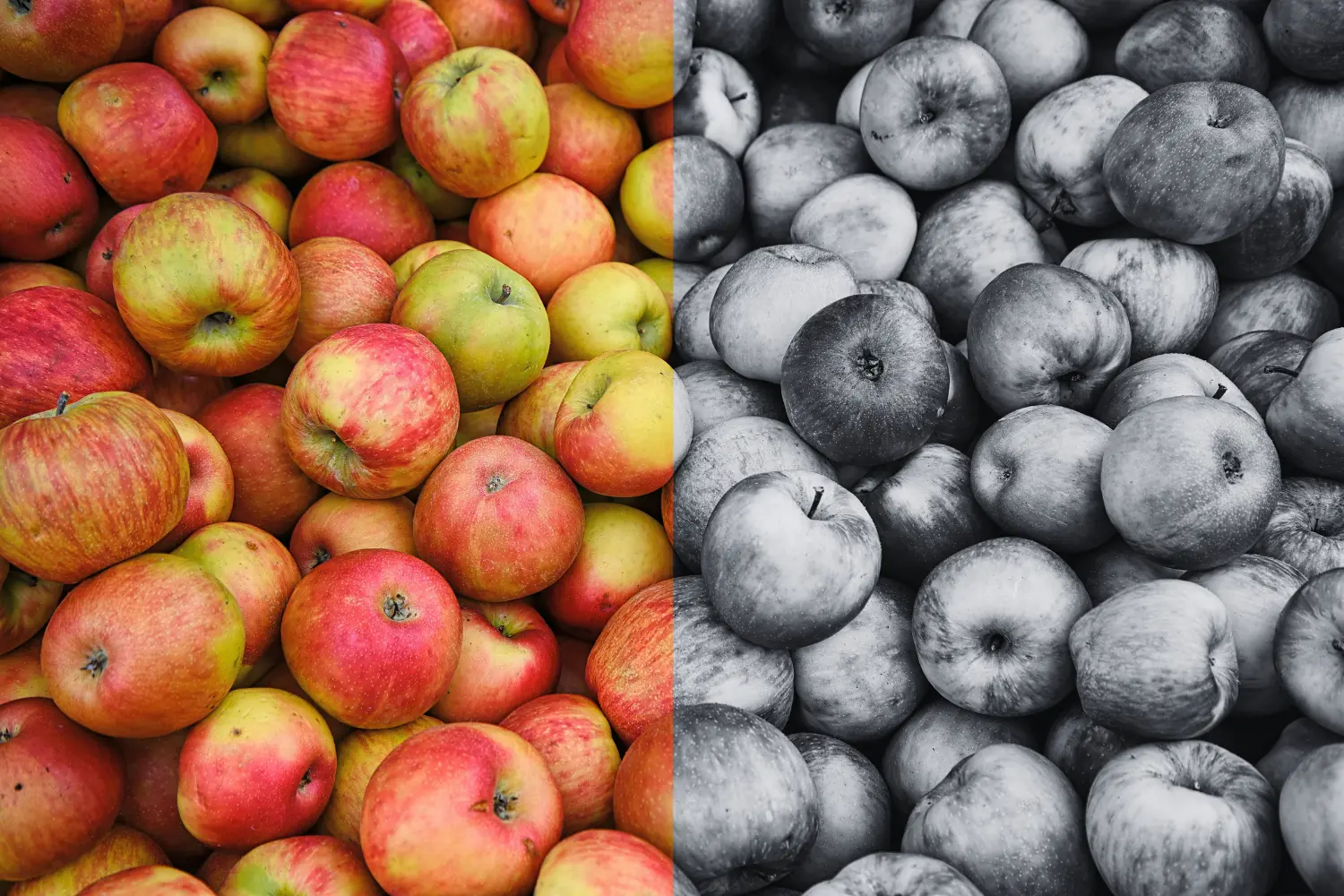
Camera choice also matters. Color cameras typically use a Bayer filter array, where each pixel on the sensor is covered by either a red, green, or blue filter, meaning no single pixel captures full color information. Instead, a demosaicing (or “debayering”) algorithm interpolates the missing color values from neighboring pixels to reconstruct each full-color pixel in the final image. This process inherently reduces effective resolution because multiple sensor pixels are needed to produce one true color pixel, and the interpolation can introduce artifacts or slight blurring.
In contrast, monochrome cameras dedicate every pixel to capturing light intensity without any filtering, resulting in denser spatial sampling and higher effective resolution from the same sensor size. This makes mono cameras the preferred choice for applications where maximum detail, edge sharpness, and dimensional accuracy are critical.
Sensors: What do the Specifications Mean?
When reviewing camera datasheets, you’ll encounter several key metrics regarding the sensor. Here’s what they mean for your application.
Megapixels (MP): The total pixel count. This defines the amount of discrete image data the sensor can capture in a single frame. Higher pixel counts provide more detail but require more processing power, storage, and bandwidth.
Sensor Size: Usually specified in fractional inches (like 1/2.3″ or 2/3″). Note that these numbers refer to an optical standard from old vidicon tubes rather than the actual physical diagonal – some manufacturers may list sensor size as the effective active area, in mm2 or a height and width in mm. Larger sensors generally offer better light sensitivity and lower noise. They also allow for shallower depth of field, which matters when working with zoom lenses.
Pixel Size: Measured in micrometers (μm). Larger pixels collect more light and typically have better sensitivity and signal-to-noise ratios. Smaller pixels allow for higher resolution in the same sensor size but may struggle in low-light conditions. You’ll often see sensors with 3.45 μm, 4.8 μm, or 5.5 μm pixel sizes.
Resolution: Listed as horizontal x vertical pixels (e.g. 1920 x 1080). This tells you the output image dimensions and aspect ratio.
Frame Rate: How many images per second the sensor can capture at full resolution. Many sensors can achieve higher frame rates by discarding pixels or using reduced resolution modes.
The Resolution-Speed Trade-off
Higher resolution always comes with costs. More pixels mean longer transfer times, heavier processing loads, and larger storage requirements. A 12MP camera at 60 fps generates roughly 2.7 GB of uncompressed data per second depending on bit depth and color format. Any vision system handling this throughput must be designed to manage such high data rates across its interface, processing pipeline, and storage.
Many applications benefit from matching resolution to actual requirements rather than maximizing pixel count. A 2MP camera running at 200 fps may outperform a 12MP camera at 30 fps for high-speed inspection tasks.
Finally, verify that your lens can actually deliver the resolution your sensor captures. Check MTF curves at relevant spatial frequencies. A high MTF value indicates the lens’ ability to preserve contrast at fine detail level, supporting high camera resolution. A sharp lens matched to a moderate-resolution sensor will outperform an average lens on a high-resolution sensor.
Autofocus-Zoom Cameras: Resolution in Motion
Autofocus-zoom cameras add another layer of complexity to resolution considerations. These systems dynamically adjust focal length and focus position, which directly impacts the effective resolution at your target.
When you zoom in, you’re magnifying a smaller portion of the scene. The same 5MP sensor now spreads those pixels across a narrower field of view. This increases your spatial resolution – the number of pixels per millimeter of the real-world object. However, optical limitations become more pronounced at longer focal lengths.
Lens quality becomes critical here. Even the best sensor can’t compensate for a poor lens. Chromatic aberration (when a lens focuses different colors of light at slightly different distances), field curvature, and MTF degradation all reduce effective resolution, especially at the edges of the image and at maximum zoom.
Autofocus systems must also maintain image sharpness as working distances change. For machine vision applications, this means your system needs sufficient depth of field to keep features in focus, or fast enough autofocus to track moving objects.
What is the Right Camera Resolution for my Application?
Start with the measurement or detection goal for your application. What is the size of the object and what is the smallest feature or measurement variation (d) you need to reliably detect?
Determine the required pixel size on the object by considering sampling several pixels across the smallest feature. The recommended sampling factor is to count in at least 2-3 pixels for reliable detection of the smallest detail and 5-10 pixels for precise measurement for example in metrology.

Examples:
Smallest feature (d) = 0.5mm, sampling factor (S) = 5 pixels, FOV (both H and V) = 150mm
Required pixel horizontal:
Required pixel = = = 1500 pixels
In our example, we need the same vertically. The sensor for the camera must therefore have at least 1500 x 1500 pixels = 2.25 megapixels.
If the application demands a highly accurate measurement within a certain tolerance (smallest feature) a higher sampling factor of e.g. 10 pixels would result in the following:
Required pixel = = = 3000 pixels
The required image sensor needs to provide at least 3000 pixels horizontally and 3000 pixels vertically, in total 9 megapixels, to fulfil the requirements.
As image sensors are usually rectangular and not square, the second example will need at least a 12MP camera with a sensor of 4096 x 3000 pixels. It is then necessary to look at the pixel size. The larger the pixel size the more light can be captured per pixel, the sensor size will be larger and so will the price.
Application-Specific Resolution Requirements
Different applications demand vastly different resolution characteristics. Machine vision interfaces such as CoaXPress and Camera Link deliver dependable high-bandwidth performance, enabling the integration of high-resolution cameras. Common applications include:
PCB Inspection: Detecting 0.1mm defects on circuit boards requires high spatial resolution. You might need 10-20 pixels per defect to reliably detect and classify issues. With a 100mm field of view, this means 1000-2000 pixels across the image, translating to roughly 2-4MP minimum. Larger boards or smaller defects push requirements even higher.
Barcode Reading: One-dimensional barcodes are forgiving. You need roughly 5-10 pixels across the narrowest bar element. For a Code 128 barcode with 0.25mm modules at 300mm working distance, a 1-2MP camera often suffices. 2D codes like Data Matrix require more resolution, especially when codes are small or damaged.
Optical Character Recognition (OCR): Text recognition needs enough resolution to distinguish similar characters (like “8” and “B” or “0” and “O”). Generally, 8-12 pixels per character height works well. Your lens choice and sensor need to allow this many pixels per character. But if you’re reading serial numbers across a wide field of view, you may need more resolution to compensate for lens effects.
Robotic Automation: Pick-and-place applications often determine object position and orientation to within 1-2mm. Required resolution scales with workspace size. A 500mm x 500mm workspace needing 1mm accuracy requires at least 500 pixels in each direction, suggesting a 0.3MP camera minimum. In practice, you’d use 2-5MP for noise immunity and subpixel accuracy.
Measurement and Metrology: These applications often demand the highest resolutions. Measuring a 50mm part to ±0.01mm accuracy requires theoretical resolution better than 0.005mm – meaning 10,000 pixels across 50mm. This suggests 100+ megapixels if inspecting the entire part simultaneously. More commonly, engineers use zoom lenses or scanning approaches to achieve required resolution within practical camera constraints.
The Best Resolution is The One That Solves Your Problem
Resolution in machine vision isn’t just about megapixels. It’s about matching sensor capabilities to application requirements while balancing speed, cost, and optical performance. Understanding sensor specifications and how they translate to real-world measurement capabilities allows you to design vision systems that deliver reliable results without unnecessary complexity or cost.
Machine vision interfaces like CoaXPress guarantee reliable high-data throughput, enabling the use of high-resolution cameras. Active Silicon’s FireBird CoaXPress frame grabbers are compatible with machine vision cameras from a multitude of manufacturers, covering hundreds of different models.
Our Harrier range of autofocus-zoom cameras includes models with sensor resolutions from 2MP to 8MP, and sensor sizes from 1/1.8” to 1/2.8”. Full HD or 4K output resolution and optical zoom up to 55x options are available. Our team can guide you through selecting the best one for your application.
View the full range of frame grabbers, autofocus-zoom cameras or contact us for specific guidance on selecting components for your vision system.