Tech Focus: Integrating a Frame Grabber into a Vision System
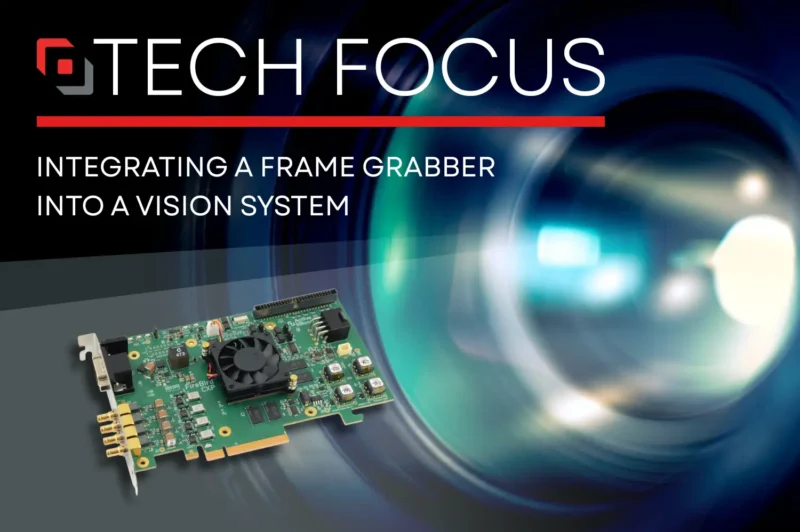
When deploying a machine vision system including a frame grabber, successful integration and implementation are crucial for ensuring that the high-speed image capture and processing requirements of your system are met.
Our white paper, Understanding Frame Grabbers in Vision Systems, is a deep dive into frame grabber operation, optimisation and selection. This chapter focusses on integrating an acquisition card in a high-speed imaging system, and what factors to consider.
Frame grabbers enable precise timing
Frame grabbers are designed to connect cameras and sensors seamlessly with host computers. This is enabled by standardized interfaces such as CoaXPress, CoaXPress over Fiber, and Camera Link, ensuring compatibility with a wide range of imaging devices.
Integrating a frame grabber often involves syncing it with camera triggers or external timing signals. Synchronization ensures that the captured frames correspond accurately to the intended events or conditions.
Triggers can be driven by TTL, RS-422, or optically isolated inputs, so are perfect for complex industrial environments. With programmable delays, and complex multi-input triggering scenarios (common for line scan and multi-camera applications), they add the flexibility needed for advanced imaging systems.
Hardware triggers, often used in high-speed applications, provide minimal latency and ensure frame capture at exact moments, while software triggers offer flexibility for less time-sensitive processes. By utilizing trigger inputs and outputs, CoaXPress frame grabbers enable reliable synchronization in applications such as industrial inspection, scientific imaging, and motion analysis. For more detail on this, see our Technical Note Using an External Trigger Input with a FireBird CoaXPress Board.
What mechanical and electrical factors should be considered?
Form Factor and Mounting
The physical design of the frame grabber must align with the host system’s architecture and available space. Beyond simply fitting into a designated slot, engineers may need to account for airflow, cable routing, and accessibility for maintenance.
In some applications, custom mounting brackets, shock-absorbing fixtures, or ruggedized enclosures are required, especially in industrial or outdoor environments where vibration, temperature fluctuations, or exposure to contaminants can affect performance and longevity.
Power and Cooling Requirements
High-performance frame grabbers may need a specific power input, usually a PCI Express Graphics (PEG) connector, to run connected cameras. They also require efficient cooling to stay within safe operating temperatures. This can include high-CFM case fans, directed airflow over PCIe slots, or GPU-style heatsinks with built-in fans.
What to look for in frame grabber software and driver support
Robust, well-supported drivers are essential for ensuring the frame grabber communicates effectively with the host operating system. These drivers manage the low-level interactions between the hardware and the system software, and their quality directly influences system stability, latency, and overall performance. Good driver support also simplifies integration, reduces development time, and minimizes troubleshooting during deployment.
Compatibility
Make sure the driver supports the intended OS (e.g., Windows, Linux) or any real-time operating systems (RTOS) if used in critical applications. It’s also important to verify compatibility with specific kernel versions, distribution variants, and third-party libraries or frameworks that the imaging pipeline may depend on.
Firmware Updates
Regular firmware updates can address bugs, improve performance, and add new capabilities, so an update strategy should be in place. Consider whether updates can be applied remotely, whether they require device downtime, and how version control will be managed across multiple deployed systems.
APIs and Software Development Kits (SDKs)
Many frame grabber manufacturers provide APIs and SDKs that simplify the development of custom applications. These software tools allow developers to control the hardware settings, capture images, and process data in real time.
For example, an SDK may include libraries for adjusting exposure, gain, or image formats, and might support programming languages such as C++, C#, Python, or .NET.
Active Silicon’s proprietary SDK, ActiveSDK provides components to develop applications using:
- PHX library– provides setup, acquisition and control features.
- Active Display Library– allows captured buffers to be displayed easily.
- Active Image Processing Library– provides image file open/save, image format conversion (e.g. Bayer to RGB), JPEG compression and other image processing functions.
- Active Browser – provides a widget that can display any number of GenApi nodemaps, each in their own tab. The Active Browser library also provides a way to integrate the widget within an MFC program.
- GenTL Producer – GenICam compliant driver package.
- GPUDirect for Video™ – accelerated acquisition and processing, including DMA directly to the GPU.
Image Processing Integration
Software compatibility with image processing libraries (e.g., OpenCV) or proprietary analysis tools is essential for systems that require advanced analytics, such as defect detection or automated quality control.
How important is the GUI?
Many frame grabbers come with dedicated configuration software that allows users to adjust parameters, monitor performance, and visualize captured data in real time.
Graphical User Interfaces (GUIs) reduce the need for deep technical knowledge when configuring the system, making it accessible for operators. Built-in diagnostic tools can help troubleshoot issues, such as identifying synchronization problems or data bottlenecks.
Want to read more about the benefits a frame grabber can bring to vision systems? Read the full whitepaper.